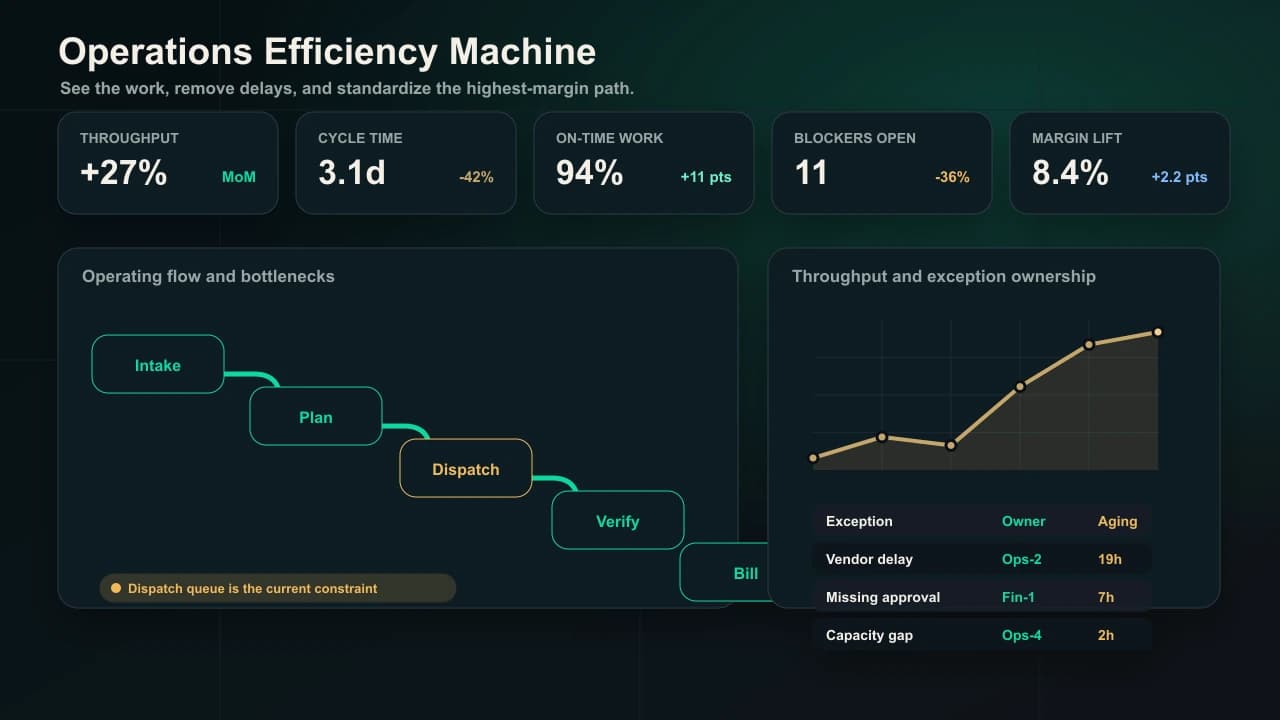
Margin expansion
Turn manual handoffs and hidden bottlenecks into an operating machine that moves faster every week.
Less rework, fewer delays, cleaner handoffs, faster cycle times, and a clearer path to margin expansion.
Cycle
Time reduction
Shorten the path from request to completed work by removing avoidable waits.
Rework
Reduction
Catch missing information and quality issues before they move downstream.
Margin
Visibility
Tie workflow drag to cost, capacity, service level, and management action.
Field Pattern
Operations AI should look like a stage-gate system, not a loose tool shelf.
The best operating systems define the real gates in the workflow: what enters, what must be validated, who owns the decision, what evidence is required, and what moves the work forward. AI then does the heavy lifting around each gate while people keep control of exceptions and tradeoffs.
Map the as-is workflow into named stages, owners, entry criteria, and exit criteria.
Use AI to gather evidence, check completeness, draft handoffs, and surface blockers.
Review flow weekly by cycle time, rework, stuck items, and margin impact.
Anonymized Operator View
What the operations machine shows leaders every day.
Operators do not need another attractive dashboard. They need a work-control view that shows which handoffs are stuck, what evidence is missing, who owns the decision, and what gets margin back.
Auto
Extract fields, check completeness, route standard work, and refresh status.
AI Draft
Prepare handoffs, variance notes, approval packets, and risk summaries.
Human Led
Decide exceptions, tradeoffs, customer commitments, and operating changes.
Operations Flow Command
Daily throughput and exception review
31h
Waiting time found
Avoidable pauses surfaced across one priority workflow.
12
Stuck handoffs
Items without owner, evidence, or exit criteria.
7
Margin leaks
Rework, expedite, discount, or delay patterns to attack.
Pipeline Control
Quote package missing engineering inputs
Ops manager
Gate failed completeness check
Route evidence request to engineering owner.
Field schedule change pending approval
Planning lead
Customer date moved + no owner
Draft decision packet for supervisor review.
Order-to-cash mismatch
Finance ops
Invoice variance above tolerance
Compare contract, PO, and delivery evidence.
Action Plan
Day 1
Map the gate logic and name the required evidence.
Day 3
Automate completeness checks, handoff drafts, and owner routing.
Week 2
Install exception views tied to cycle time and cost impact.
Weekly
Review stuck work, repeat causes, and next workflow expansion.
Intelligence Gaps
Entry criteria are not consistently captured before work moves.
Approval reason codes are missing on late-cycle exceptions.
Cost impact is visible after the delay, not while it can be prevented.
Feedback Loop
Workflow signal
Missing input, wait time, status drift, or variance event.
AI machine
Validate, route, draft, summarize, and surface the blocker.
Team judgment
Resolve the exception and tune the gate for next time.
Best Fit
Where this creates the most value.
Operations-heavy businesses with manual coordination, order-to-cash friction, approval delays, spreadsheet reporting, or too many status meetings.
Symptoms
Managers spend too much time chasing status instead of improving throughput.
Work moves through email, spreadsheets, shared drives, and tribal knowledge.
Approval queues and exceptions create expensive delays.
Leadership sees lagging KPIs but not the workflow causes behind them.
The Machine
What ClearForge builds around the work.
01
Stage-gate map
Identify the stages, gates, entry rules, exit rules, evidence, systems, and owners that define the real process.
02
Automation layer
Use AI agents and rules to draft, validate, route, summarize, and trigger work across systems.
03
Exception layer
Separate standard work from edge cases, then route exceptions with context and ownership.
04
Cadence layer
Install dashboards and routines so leaders manage flow, quality, and margin instead of noise.
Production Plays
The first systems worth shipping.
Stage-gate intake
Extracts requirements, checks completeness, flags missing information, and advances work only when the gate is ready.
Approval and exception routing
Moves decisions to the right owner with summaries, policy checks, and recommended actions.
Operational reporting agent
Turns system data and team updates into daily summaries, KPI variance notes, and risk alerts.
Handoff quality controls
Checks whether work is ready for the next team before it creates downstream rework.
Implementation Path
From use case to operating habit.
01 · Week 1
Find the drag
Map the workflow, quantify wait time, identify rework, and choose the highest-value flow to fix first.
02 · Weeks 2-3
Build the work machine
Create stage gates, routing, validation, summaries, and reporting workflows around the real process.
03 · Weeks 4-6
Install accountability
Deploy dashboards, ownership rules, escalation paths, and weekly operating reviews.
04 · Ongoing
Expand by value
Move from one workflow to adjacent bottlenecks once the first system is stable and measured.
Related Paths
Keep exploring.
FAQ
Questions buyers ask first.
Where should operations automation start?
Start where there is high volume, repeatable decision logic, measurable cycle time, and clear business value. The best first workflow is rarely the flashiest one.
Do we need perfect data first?
No, but you need to know where data is reliable, where humans must review, and which decisions can be safely automated versus assisted.
How do you avoid disrupting daily operations?
We ship around one workflow at a time, keep human checkpoints, and install escalation paths before widening automation.
Find where this applies inside your company.
The fastest path is not choosing a generic AI tool. It is finding the growth spot, building the operating machine, and training your people into the new cadence.